Reverse engineering
Use REA (Reverse Engineer Anything) free: no API key, no card
You can run REA (Reverse Engineer Anything) for free, without an API key or a payment card, from the free-pi terminal agent: run npx free-pi-cli, sign in with GitHub, and type /reverse-engineer-anything. This post shows
You can run REA (Reverse Engineer Anything) for free, without an API key or a payment card, from the free-pi terminal agent: run npx free-pi-cli, sign in with GitHub, and type /reverse-engineer-anything. This post shows the setup and one small investigation, step by step.
REA is an open-source toolkit (rea-agents, https://github.com/morluto/rea) that gives an AI agent about 200 reverse-engineering tools: binary inspectors, SQLite readers, Android and .NET tools, and more. It does not include a model. You normally connect it to a coding agent and pay for the model. free-pi is a coding agent whose inference is paid for by terminal ads, so the combination costs you nothing. We build free-pi, so read this with that in mind.
What you need
- Node.js 22.19 or newer within 22, 24.11 or newer within 24, or 26 and newer (Node 25 is not supported). free-pi needs 22.19 or newer, and REA's loader accepts only those ranges. Some REA tools need more: its SQLite inspector needs Node 24.x at 24.15 or newer, or Node 26 and newer.
- A GitHub account to sign in.
- free-pi 0.4.5 or newer, which adds the
/reverse-engineer-anythingcommand. - For deep native analysis of compiled programs you need your own Ghidra, Hopper or IDA install. The example below does not.
No API key and no card.
Step 1: start free-pi
npx free-pi-cli
Sign in with GitHub when asked. free-pi allows one active CLI session per account. If it tells you another session is running, type /close-other-session.
Step 2: load REA
Type this inside free-pi:
/reverse-engineer-anything
The first run downloads rea-agents, which takes a short while. free-pi prints this note while it loads:
Loading REA (reverse-engineering tools) for this session. The first run downloads rea-agents, so it can take a minute.
Deep native analysis needs your own Hopper, Ghidra, or IDA install.
Step 3: check that REA is connected
/mcp
In our session the list showed:
rea connected · 207 tools · codemode · extension
If REA says "connected", the tools are available to the model.
Step 4: a first investigation
We used the official GitHub CLI (gh) 2.102.0 release for macOS arm64 as the target. It is MIT-licensed open-source software, so analysing it is lawful and a good place to start. We downloaded it ourselves from https://github.com/cli/cli/releases:
- Archive:
gh_2.102.0_macOS_arm64.zip - Archive SHA-256:
da922c20d1792e5b2cbf375593d7a658acf034c12c84e007e71c76ef959c337e(matches the digest GitHub lists for the release asset) bin/ghSHA-256:8a4258433c81106343144857750316241759d06dcf16265cf3c4864a8f2f2ad6
We unzipped it to ./gh-2.102.0/ and sent one prompt:
Use REA to inspect ./gh-2.102.0/bin/gh. Report the Go toolchain version, the main
module path and version, and the number of dependencies. Cite the tool output for each fact.
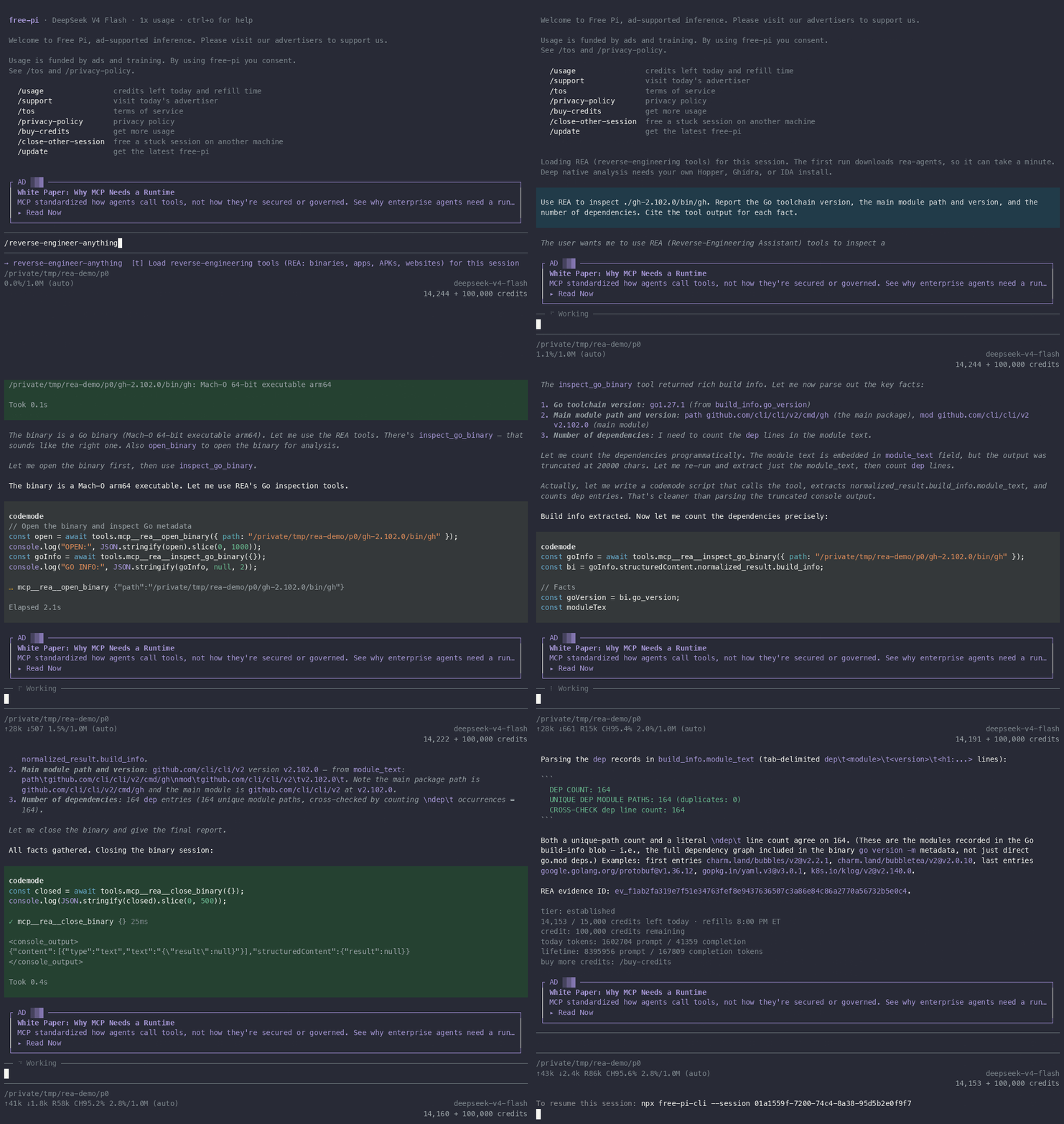
The recording is sped up and starts when we type the command. The session took about a minute.
The model found REA's inspect_go_binary tool, which reads the build information that every Go program embeds. The tool does not run the binary. The model's script printed the Go version, the main module and a dependency count taken from the tool's result:
GO VERSION: go1.27.1
MAIN PACKAGE PATH (path): github.com/cli/cli/v2/cmd/gh
MAIN MODULE (mod): github.com/cli/cli/v2 v2.102.0
DEP COUNT: 164
The model's answer:
- Go toolchain: go1.27.1.
- Main module:
github.com/cli/cli/v2atv2.102.0, main packagegithub.com/cli/cli/v2/cmd/gh. - Dependencies: 164. It checked this two ways: 164 unique module paths, and 164
deplines in the raw module text. It also said these are the modules recorded in the binary's build information, "not just direct go.mod deps".
The next post, What's really inside this Go CLI?, looks at the dependency list in detail.
What it cost
/usage before and after the investigation:
14,244 / 15,000 credits left today
14,153 / 15,000 credits left today
That is 91 credits for the whole session, from a daily allowance of 15,000. (We read the first number just before starting the recording, so it is not in the GIF.) The account also showed a separate 100,000-credit balance, which was not touched.
What went wrong
- One tool call failed. The model first called
inspect_go_binarywith no arguments, after opening the file withopen_binary. REA rejected it (the tool shows a failed call,✗ mcp__rea__inspect_go_binary {}). The model read the error, passed the file path, and the second call worked. REA's Go inspector takes a path, so you can skipopen_binary. - The model's reasoning had a slip. In its visible thinking it described
ghas "a Ghost (GitHub CLI) binary". The final answer did not repeat this, but it shows the model can misname things; check the evidence, not the narration. - One run. We ran this session once. We make no claim about how long it takes on your machine.
Use REA responsibly
Use REA only for lawful, authorized analysis: your own apps, open-source software, CTFs, and security research.
Tool output goes to the model provider, and free-pi stores traces of sessions. Do not analyse files you are not allowed to share.
Commands in one place
npx free-pi-cli
# inside free-pi:
/reverse-engineer-anything
/mcp
free-pi is in early testing; features and limits may change.
We build free-pi, and an AI model produced the analysis shown above.
Next in the series: What's really inside this Go CLI? A dependency inventory from the binary and What does your app store? Reading an app's SQLite database.