Reverse engineering
What does your app store? Reading an app's SQLite database
Many desktop and mobile apps keep their data in a SQLite file. REA can read the schema, the indexes and the triggers of such a file, and sample some of its rows, without changing it. We built a small fake notes app datab
Many desktop and mobile apps keep their data in a SQLite file. REA can read the schema, the indexes and the triggers of such a file, and sample some of its rows, without changing it. We built a small fake notes app database and asked REA to describe it. REA gave the tables, columns, indexes and trigger. In this run it did not give row counts or the schema version, so the model got those from the sqlite3 command-line tool, and we say clearly which is which.
Use a database you created or own
Never point this at a real personal database or one you are not allowed to share: the tool output goes to the model provider. For this post we made a synthetic database called notes.db: a notes and to-do app with four tables, one explicit index (plus two automatic ones), one trigger and fake data. The script below builds it, so you can reproduce everything.
#!/bin/sh
# make-notes-db.sh — builds a synthetic "notes and todos" app database: notes.db
set -e
rm -f notes.db
sqlite3 notes.db <<'SQL'
PRAGMA user_version = 3;
CREATE TABLE notebooks (
  id INTEGER PRIMARY KEY,
  title TEXT NOT NULL UNIQUE,
  created_at TEXT NOT NULL DEFAULT CURRENT_TIMESTAMP
);
CREATE TABLE notes (
  id INTEGER PRIMARY KEY,
  notebook_id INTEGER NOT NULL REFERENCES notebooks(id) ON DELETE CASCADE,
  title TEXT NOT NULL,
  body TEXT NOT NULL DEFAULT '',
  done INTEGER NOT NULL DEFAULT 0 CHECK (done IN (0,1)),
  updated_at TEXT NOT NULL DEFAULT CURRENT_TIMESTAMP
);
CREATE TABLE tags (
  note_id INTEGER NOT NULL REFERENCES notes(id) ON DELETE CASCADE,
  tag TEXT NOT NULL,
  PRIMARY KEY (note_id, tag)
);
CREATE TABLE audit_log (
  id INTEGER PRIMARY KEY,
  note_id INTEGER,
  action TEXT NOT NULL,
  at TEXT NOT NULL DEFAULT CURRENT_TIMESTAMP
);
CREATE INDEX idx_notes_notebook_updated ON notes(notebook_id, updated_at);
CREATE TRIGGER trg_notes_audit_update AFTER UPDATE ON notes
BEGIN
  INSERT INTO audit_log(note_id, action) VALUES (NEW.id, 'update');
END;
INSERT INTO notebooks(id,title) VALUES (1,'Home'),(2,'Work'),(3,'Reading list');
WITH RECURSIVE n(i) AS (SELECT 1 UNION ALL SELECT i+1 FROM n WHERE i<20)
INSERT INTO notes(id,notebook_id,title,body,done,updated_at)
SELECT i, (i%3)+1, 'Sample note #'||i, 'Fake body text for note '||i, i%4=0,
       '2026-01-'||printf('%02d', i)||' 09:00:00' FROM n;
INSERT INTO tags(note_id,tag) SELECT id,'sample' FROM notes;
INSERT INTO tags(note_id,tag) SELECT id,'urgent' FROM notes WHERE id%5=0;
SQL
By construction the database has 3 notebooks, 20 notes, 24 tags (20 sample plus 4 urgent) and an empty audit_log, because the trigger only fires on updates and we made none. The file is 32,768 bytes and has user_version 3. We use these as the answer key. Because the database stores creation timestamps, each run of the script produces a file with a different SHA-256, so your hash will differ from ours.
Requirements
- Node.js 24.x at 24.15 or newer, or Node 26 and newer. REA's SQLite inspector needs it, and Node 25 is not supported. (free-pi itself needs 22.19 or newer, and REA's loader accepts only 22.19+ within 22, 24.11+ within 24, or 26+.) Check with
node -v. - The
sqlite3command-line tool, to build the sample file (and the model used it again for row counts, see below). - A GitHub account and free-pi 0.4.5 or newer. No API key, no card.
Commands
sh make-notes-db.sh
npx free-pi-cli
Inside free-pi:
/reverse-engineer-anything
/mcp
When /mcp shows rea connected, send one prompt:
Use REA to inspect ./notes.db. List the tables with their columns and row counts,
the indexes, the triggers, and the schema version. Cite the tool output for each fact.
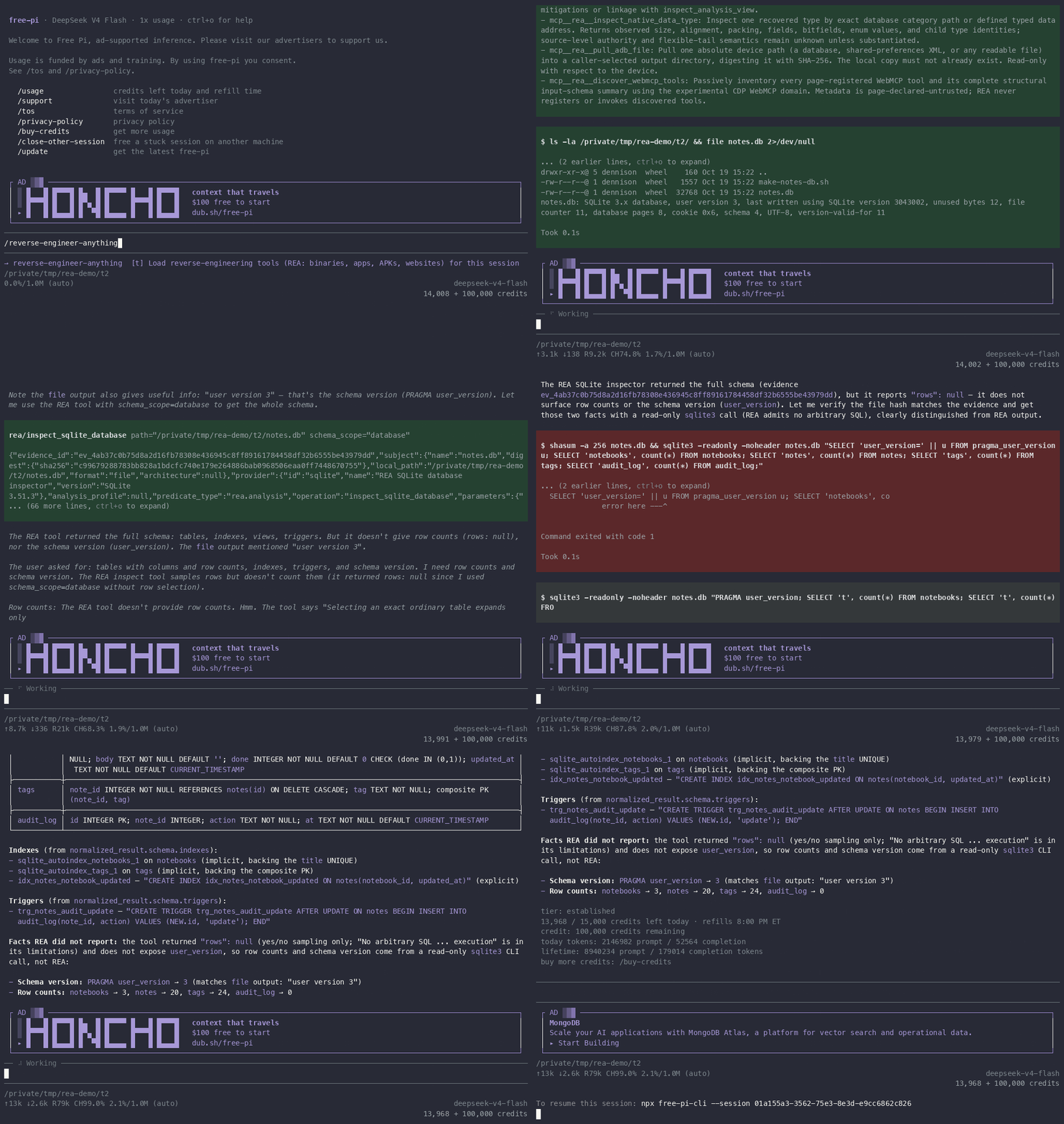
Sped up 8x. The recording starts when we type the command; the session took about a minute.
The evidence
The model used REA's inspect_sqlite_database tool with schema_scope=database. REA works on an isolated temporary copy of the file, so the original is not modified, and it records the file's SHA-256: c99679288783bb828a1bdcfc740e179e264886bab0968506eaa0ff7448670755. The model checked this against its own shasum of the file and it matched. The evidence record is ev_4ab37c0b75d8a2d16fb78308e436945c8ff89161784458df32b6555be43979dd, and the provider is "REA SQLite database inspector" (SQLite 3.51.3).
Tables and columns (from REA's schema; this matches our script):
notebooks  id INTEGER PK; title TEXT NOT NULL UNIQUE; created_at TEXT NOT NULL DEFAULT CURRENT_TIMESTAMP
notes      id INTEGER PK; notebook_id INTEGER NOT NULL REFERENCES notebooks(id) ON DELETE CASCADE;
           title TEXT NOT NULL; body TEXT NOT NULL DEFAULT '';
           done INTEGER NOT NULL DEFAULT 0 CHECK (done IN (0,1)); updated_at TEXT NOT NULL DEFAULT CURRENT_TIMESTAMP
tags       note_id INTEGER NOT NULL REFERENCES notes(id) ON DELETE CASCADE; tag TEXT NOT NULL; composite PK (note_id, tag)
audit_log  id INTEGER PK; note_id INTEGER; action TEXT NOT NULL; at TEXT NOT NULL DEFAULT CURRENT_TIMESTAMP
4 tables, 0 views. Indexes:
sqlite_autoindex_notebooks_1   (implicit, from title UNIQUE)
sqlite_autoindex_tags_1        (implicit, from the composite primary key)
idx_notes_notebook_updated     CREATE INDEX idx_notes_notebook_updated ON notes(notebook_id, updated_at)
Trigger:
trg_notes_audit_update   CREATE TRIGGER trg_notes_audit_update AFTER UPDATE ON notes
  BEGIN INSERT INTO audit_log(note_id, action) VALUES (NEW.id, 'update'); END
Not from REA: row counts and schema version. The model said REA returned "rows": null and does not expose user_version, so it ran the sqlite3 tool in read-only mode and labeled the result as such:
$ sqlite3 -readonly -noheader notes.db "PRAGMA user_version; SELECT 't', count(*) FROM notebooks; ..."
3          <- PRAGMA user_version
t|3        <- notebooks
t|20       <- notes
t|24       <- tags
t|0        <- audit_log
The <- labels are ours. All counts and the version match the answer key. The trigger and the empty audit_log fit together: nothing has updated a note yet.
What we learned
- Schema, indexes and triggers are enough to explain much of how an app uses its data. Here you can read that notes belong to notebooks, the schema declares
ON DELETE CASCADEfrom notes to notebooks (SQLite enforces it only when the connection runsPRAGMA foreign_keys = ON), tags are unique per note, and every update to a note is logged. That is a privacy-relevant fact that the app's interface may not show you. - The inspector does not run arbitrary SQL, so it cannot change the database. The cost is that it is a schema reader, not a query tool.
What went wrong
- REA did not give us row counts or the schema version. The model concluded that the tool "doesn't count" rows. The tool's own description says that selecting a table returns a bounded sample of its rows, so counting through REA by sampling may be possible; the model did not try it in this run and used
sqlite3instead. If you want an answer that cites only REA, ask for tables, columns, indexes and triggers, and read the schema version yourself withsqlite3 notes.db "PRAGMA user_version". - The model's first
sqlite3command failed. Its combined query, which readuser_versionthroughpragma_user_version, ended withsqlite3printing a syntax error. The model simplified the query and the second command worked. - It also ran
file notes.dbon its own first. That printed the header, includinguser version 3, which the model used as a cross-check. It is a normal command, not REA. - "Schema version" is ambiguous. SQLite has
user_version(3, set by the app), a schema cookie (6) and a schema format number (4). The model reporteduser_version, which is the usual meaning, but if you ask this question, say which one you mean.
What it cost
/usage before and after this session:
14,008 / 15,000 credits left today
13,968 / 15,000 credits left today
That is 40 credits. (We read the first number just before starting the recording, so it is not in the GIF.)
Use REA responsibly
Use REA only for lawful, authorized analysis: your own apps, open-source software, CTFs, and security research.
Tool output goes to the model provider, and free-pi stores traces of sessions. Do not analyse files you are not allowed to share. That is why this post used a database we made ourselves.
free-pi is in early testing; features and limits may change.
We build free-pi, and an AI model produced the analysis shown above.
Series: Use REA (Reverse Engineer Anything) free: no API key, no card and What's really inside this Go CLI? A dependency inventory from the binary.