Cyber defense
How to run abliterated models: on your own GPU, or free in your terminal
If you do security work with language models, you know the moment.
If you do security work with language models, you know the moment. You ask a model how a known CVE gets exploited so you can write a detection for it, or to pick apart a malware sample from your sandbox, and it says no. Abliterated models are the community's answer to that. This post explains what they are, where to find them, what hardware it takes to run them yourself, and the shortcut if you don't have that hardware.
Disclosure: free-pi is Dennison's project. This guide is useful whether or not you ever use it; the free-pi section is the last one.
What abliteration actually is
In 2024, Arditi et al. showed that refusal in chat models is controlled by a single direction inside the model. They found it in 13 open models up to 72B parameters. Remove that direction and the model stops refusing. Add it back and the model refuses even harmless requests. (paper)
Abliteration (ablation plus obliterate) turns that finding into a recipe. Maxime Labonne's Hugging Face write-up is the standard explainer:
- Run the model on a set of harmful prompts and a set of harmless ones, and record its internal activations.
- Take the average difference between the two. That difference is the refusal direction.
- Edit the weights that write into the model's residual stream (typically the attention output and MLP down projections) so they can no longer write along that direction.
The key point is that this is a permanent weight edit. It is not a jailbreak prompt, a system prompt, or a fine-tune on new data. The model keeps its knowledge and mostly keeps its skills. Labonne notes it can cost some quality, which is why some releases "heal" the model afterward. Newer tools like Heretic automate the process and add refinements such as norm-preserving ablation.
Why security people care: pentesting, red teaming, malware analysis, exploit research for patching, and writing detection rules all involve content that safety-tuned models often decline. An abliterated model removes the friction for that legitimate work. It also removes the guardrails, so the responsibility for how it's used sits with you.
Where abliterated models live
Almost all of them are on Hugging Face. Search for "abliterated" and you'll find thousands. A few real, active examples:
- huihui-ai publishes abliterated versions of most popular open models, for example an abliterated Qwen3.6 27B and gpt-oss 120B. Many are mirrored on Ollama, such as Qwen3 and Gemma 3.
- Qwen2.5 32B Instruct, abliterated by sci4ai documents its exact method (200 harmful and 200 harmless prompts, 62 of 64 layers edited).
- Frontier-scale MoE models get abliterated too, such as DeepSeek V4.1 Flash, abliterated by s-zaizen and another version by distributedcognition. These are research releases and their model cards say so.
Tips for picking one: check the base model, read whether the author published refusal numbers, and look at the "Quantizations" link on the model page for ready-made GGUF builds.
Option 1: run it yourself
How much hardware you need
The rule of thumb is parameters times bits per weight divided by 8, plus room for context (the KV cache) and runtime overhead. A measured table of real GGUF sizes (Oct 2026) gives these totals at the common Q4_K_M quantization, 8k context, one request. An abliterated model is the same size as its base, so these apply directly.
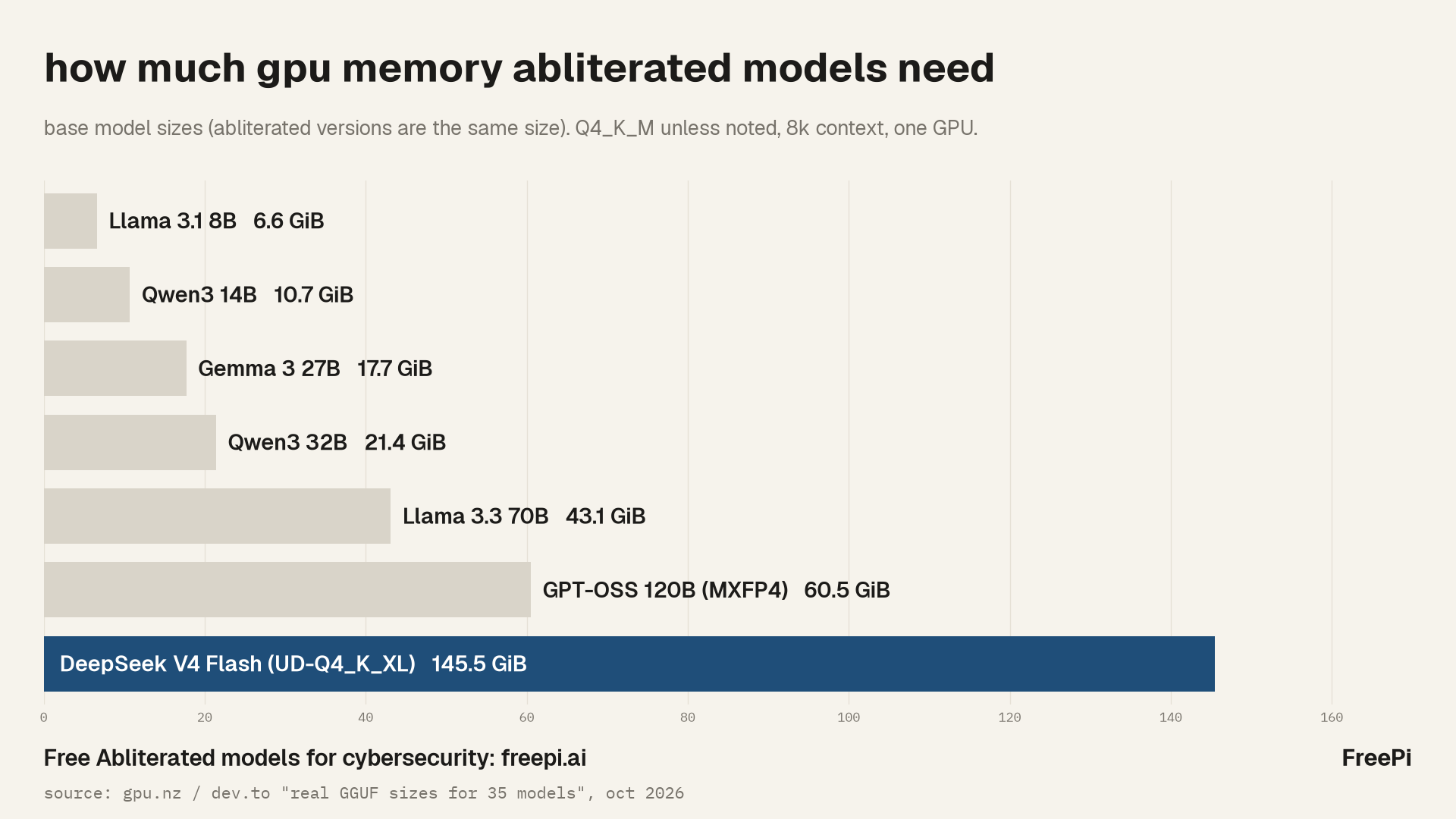
| Model size | Example | Memory at Q4_K_M, 8k | Memory at 32k | Smallest single card |
|---|---|---|---|---|
| 8B | Llama 3.1 8B | 6.6 GiB | 9.6 GiB | 8 GB |
| 14B | Qwen3 14B | 10.7 GiB | 14.4 GiB | 12 GB |
| 27B | Gemma 3 27B | 17.7 GiB | 19.6 GiB | 24 GB |
| 32B | Qwen3 32B | 21.4 GiB | 27.4 GiB | 24 GB |
| 70B | Llama 3.3 70B | 43.1 GiB | 50.6 GiB | 48 GB |
| 120B MoE | gpt-oss 120B (MXFP4) | 60.5 GiB | 61.3 GiB | 80 GB |
| ~290B MoE | DeepSeek V4 Flash | 145.5 GiB | 145.8 GiB | multi-GPU |
Source: gpu.nz via DEV. Higher precision costs a lot more: another calculator puts Qwen3 32B at about 23 GB at Q4_K_M and about 69 GB at FP16. Mixture-of-experts models save compute, not memory, because all the experts still have to be loaded.
The biggest abliterated models are out of reach for a home setup. The abliterated DeepSeek V4.1 Flash checkpoint above is about 510 GB of weights across 48 files (model card), and its runners show 4 to 8 datacenter GPUs.
Ollama (easiest)
Install Ollama, then pull an abliterated model by name:
ollama run huihui_ai/qwen3-abliterated:8b
ollama run huihui_ai/gemma3-abliterated:27b
ollama run huihui_ai/qwen3.6-abliterated:27b
These tags come from the Ollama library and the huihui-ai model card. Some need a recent Ollama version, so update first.
llama.cpp (most control)
llama.cpp can pull a GGUF straight from Hugging Face and serve an OpenAI-compatible API:
llama-server -hf <user>/<model>-GGUF:Q4_K_M --port 8080 -c 8192 -ngl 99
Replace the repo with a GGUF build from the model's Quantizations list. -ngl 99 puts every layer on the GPU, and -c sets the context size. The API is then at http://localhost:8080/v1/chat/completions.
LM Studio (GUI)
In LM Studio, search "abliterated" in the model browser, pick a GGUF quant that it marks as fitting your machine, and load it. It can also run a local OpenAI-compatible server for your tools.
vLLM (servers and throughput)
If you have a real GPU server and want to serve a team, use vLLM with the full-precision weights:
vllm serve huihui-ai/Huihui-Qwen3.6-27B-abliterated --port 8000
A 28B BF16 model needs roughly twice its parameter count in GB, so plan on an 80 GB card or two smaller ones. Check that vLLM supports the architecture first; for DeepSeek V4.1 Flash, the model cards say mainline support was still landing and point to SGLang or DeepSeek's reference runtime.
Upsides of running locally: nothing leaves your machine, it works offline, no usage limits, and you can pick any model or quant. Downsides: hardware cost, setup time, and the best models need far more memory than any desktop GPU has. A small model on a laptop is fine for chat; it is a weaker coding agent.
Option 2: run it free in free-pi
free-pi is a free coding agent for your terminal. Ads pay for the model, so you don't need a GPU or an API bill, and you get abliterated models that are much bigger than what fits on a desktop card.
npx free-pi-cli@latest
Sign in with GitHub, run /model, open the Defense section (signed-in users only) and pick an abliterated model (for example Abliterated Large Flash or DeepSeek V4.1 Flash Abliterated), then point it at your repo. It's a full agent: it reads files, edits code and runs commands, so you can use it for things like writing a scanner for your lab network, explaining a decompiled function, or drafting detection rules.
The tradeoffs are real too. It isn't local, so don't paste in data you can't share with a hosted provider. It shows ads. And it has usage limits so the free tier stays free.
More on the security use case: freepi.ai/cybersecurity
Which one should you pick
| Local (Ollama, llama.cpp, LM Studio) | Local server (vLLM) | free-pi | |
|---|---|---|---|
| Cost | Your GPU | Your servers | Free, ad supported |
| Hardware | 8 to 24 GB GPU for 8B to 32B | 80 GB+ GPUs | None |
| Largest practical model | ~32B on one consumer card | Whatever you can fit | Large hosted abliterated models |
| Privacy | Fully local | Your infrastructure | Hosted, not local |
| Setup | Minutes to an hour | Hours | One command |
| Coding agent | Bring your own | Bring your own | Built in |
| Limits | None | None | Usage limits |
Short version: if your data can't leave the building, run it locally and accept a smaller model. If you want a big abliterated model doing agent work today without buying hardware, try free-pi.
A note on responsible use
Abliterated models will answer things a normal model won't. Use them for work you're authorized to do: your own systems, engagements with written scope, research and defense. The model cards say the same.